AI accessory photoshoots for jewellery and bags
Accessories disappear at full-length framing. The Accessory shoot type puts them on a model at close crop — neck, hand, face — and you talk the crop into place.
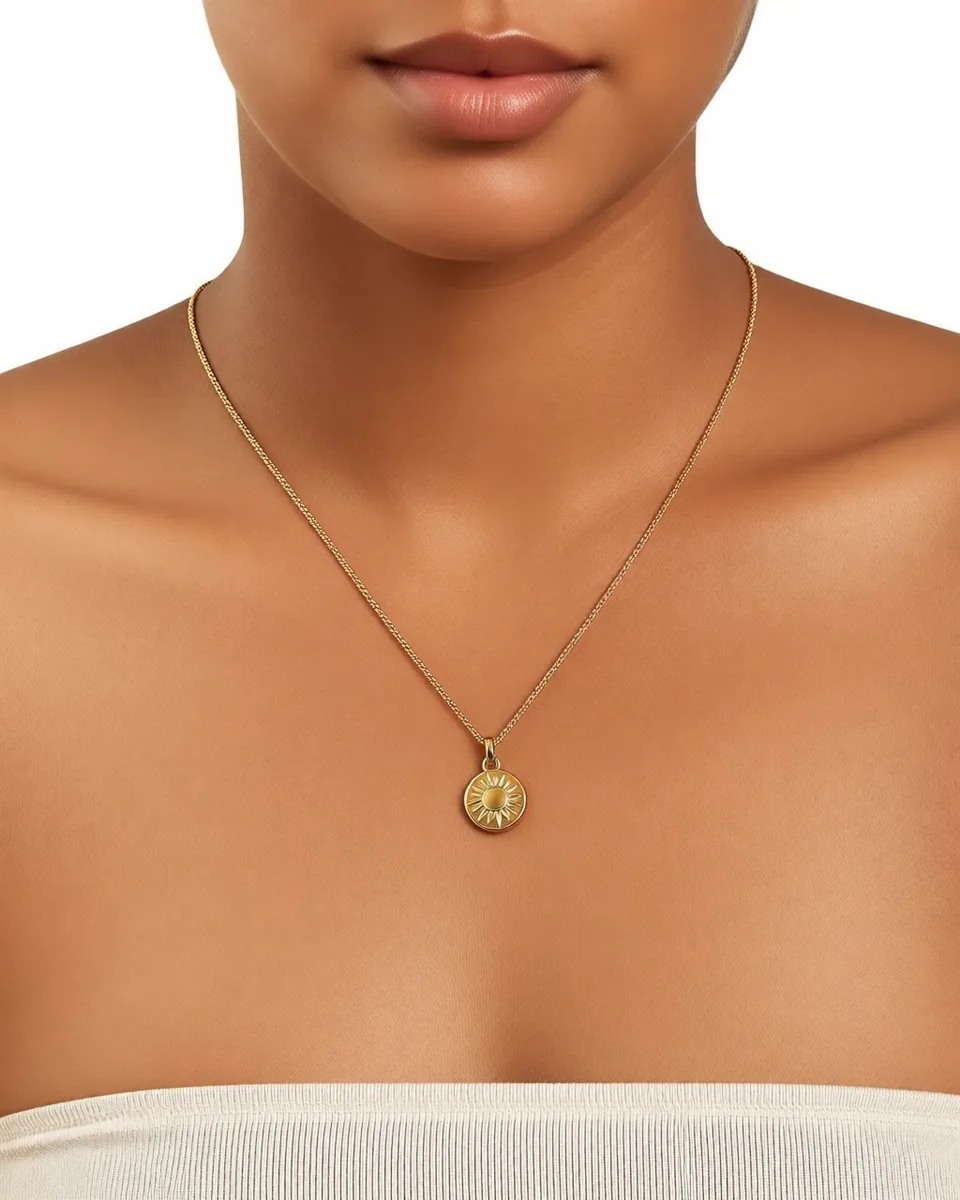
A necklace is the smallest thing in a full-length photograph
Apparel photographs well at a distance. A dress needs the whole body in frame to make any sense at all. Accessories are the opposite problem: put a fine chain on a model at full length and the thing you are asking someone to buy occupies a thumbnail's worth of the image.
Then there is the surface. Gold, silver, glass and patent leather are mirrors — they photograph the room, not themselves. A stone reads as a grey dot without a light placed to catch it. Anyone who has shot jewellery knows the day is mostly spent moving one lamp four inches at a time.
And the placement is fiddly in a way garments are not. A necklace needs a neck and a chin. A ring needs a hand doing something plausible with itself. Sunglasses need a face that suits the frame shape. A tote needs a shoulder and a walk. None of that is solved by putting the item on a white sweep and hoping.
The Accessory shoot type
Selvette's Studio has three shoot types — On-model for apparel, Product Scene for styled product-only shots with no model, and Accessory, which exists because worn accessories behave differently to worn clothes.
You start from the packshot already sitting in your product admin. Cast the shot from the model roster or bring your own, then set skin tone from Fair through Deep, expression and hair — hair matters more here than anywhere else, since it is the thing that hides an earring or a chain. Set the scene from studio, city street, garden, living room or golden-hour, or upload a location of your own. Lighting runs soft daylight, golden hour, softbox, hard flash, moody and neon, which is the dial you will spend most time on with anything reflective. Mood runs editorial, minimal luxury, playful, vintage film, high fashion and warm natural.
Then choose poses — up to 6 from a nine-shot list: front, back, three-quarter, profile, walking, seated, leaning, hands on hips and over shoulder. Profile is the shot an earring range never has. Walking is what sells a bag. Set the aspect ratio for the destination, one per run: 4:5 for the product page, 1:1 for the collection grid, 3:4 or 9:16 for a reel.
An image takes about six seconds and costs 1 credit. A generation that fails costs nothing — the credit is reserved when the job starts and released if it fails, errors, or is rejected before delivery.
Getting the crop right is a conversation, not a setting
No dropdown will ever contain "close on the neck, one hand touching the necklace, but do not cut her face off". That is why the shoot stays open as a conversation after the first frame lands, and why accessories are where this earns its keep.
A real chain looks like this:
close up on the neck, one hand touching the necklace don't cut her face, pull back a bit warmer light, hair up
3 sends, 3 credits, and a shot that no preset combination would have produced. The product stays consistent across every turn — the clasp does not migrate, the stone count does not change, the chain does not quietly become a different chain because you asked for warmer light.
You can also branch from any earlier turn. Turn 2 gave you the crop you wanted; turns 3 and 4 went somewhere cold and strange. Go back to 2, take a different road, and keep both. For a range that means one good composition can produce the studio version and the golden-hour version without rebuilding the shot from the top.
What to check on metal, glass and leather
Reflective product is the hardest thing to hold, and the place to be sceptical rather than pleased.
- Stone and link count. Count them in the output against the packshot. Symmetrical repeats are where detail drifts.
- Clasps, hinges and hardware. The parts a photograph often hides are the parts most likely to be invented.
- Lens tint and shape on eyewear, which changes character under hard flash.
- Hardware finish on bags — whether gold has stayed gold, and whether the logo plate still reads.
- Scale against the body. A hoop that sits right in the packshot can come back a size larger on a model.
If something is off, correct it in the next turn rather than starting again. That is cheaper in credits and it keeps the composition you already liked.
Looks, and getting it onto the product page
Once a run looks like your brand, save the configuration as a Look. The next 30 SKUs start from it, which is what makes a jewellery grid read as one shoot rather than thirty. Results land in a Gallery, where you download them or publish straight onto a Shopify product or a specific variant — the gold version on the gold variant. On Shopify that is one click; on any other storefront the same thing runs from a snippet.
If you also sell apparel, the flat-lay to on-model workflow covers the garment side of the same catalogue, and the full use-case index lists the rest.
FAQ
Can AI photograph jewellery on a model from a packshot?
Yes. The Accessory shoot type takes the product photo already in your admin and places the item on a model, at the neck, hand, ears, face or shoulder, with control over the model, skin tone, expression, hair, scene, lighting, mood, pose and aspect ratio. Each frame takes about six seconds and costs 1 credit, and you adjust the result in plain language afterwards rather than re-running from scratch.
How do I get a close crop rather than a full-length shot?
Ask for it in the conversation. Framing is set before the first generation, but the fine control comes from the turns after it — "close up on the neck", "pull back a bit", "tighter on the hands". Because you can branch from any earlier turn, you can also keep a wide version and a close version of the same shot without starting over. Each send costs 1 credit; see how the credit balance works.
Does it work for eyewear and bags as well as jewellery?
Yes — the Accessory type covers jewellery, eyewear and bags. Eyewear tends to need attention on lens tint and how the frame shape sits against a face, so choose the model and lighting with that in mind. Bags respond well to pose: a walking or three-quarter pose shows strap drop and body scale in a way a product-only shot cannot.
What if the generated image gets a detail wrong?
Correct it in the next turn — say what is wrong and the shoot carries on with the product held consistent. If a generation fails or errors outright, the credit is released and you are not charged. There is a longer walk-through of the review habit in how to get on-model photos without a photoshoot.